
What content should you show on internal communication screens?
Company news, practical information, safety, projects and team life: learn how to build a useful content schedule for workplace screens.
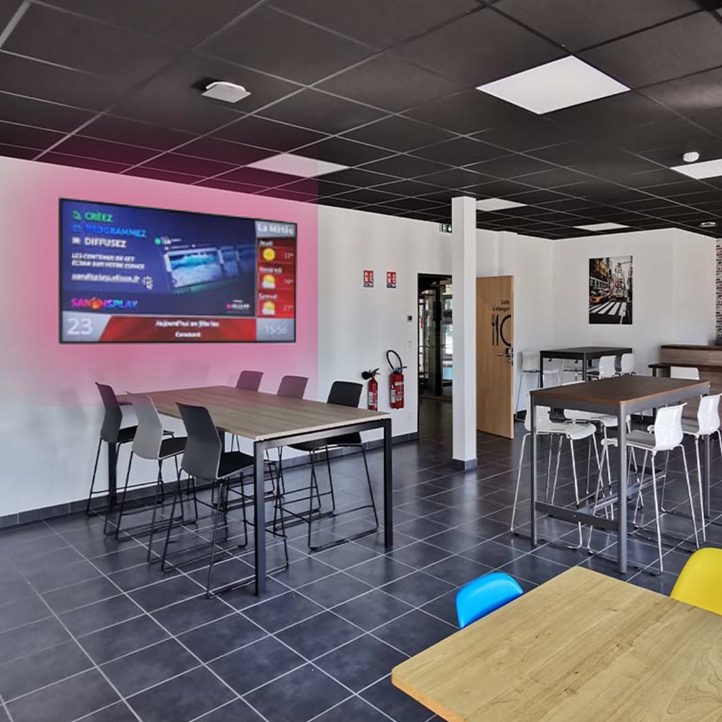
Installing screens in a workplace does not automatically improve employee communication. Organisations still need to select useful content, establish priorities and refresh messages at the right pace. An overly corporate schedule soon blends into the background, while a constant stream of urgent notices makes the channel difficult to follow.
A better approach is to treat the network as an internal information service. Every screen should address the needs of the people who see it in the specific context where it is installed. Content, location, viewing time and editorial responsibility therefore need to be planned together as part of a corporate digital signage strategy.
Start with employee needs, not with the screens
Before producing a playlist, list the questions internal communication needs to answer. What is happening on the site today? Which projects affect particular teams? Which deadlines must not be missed? Where can someone find a procedure or the right contact? This exercise prevents available but low-value messages from filling the schedule.
Needs vary by location. At reception, employees and visitors may require directions or general news. In a staff restaurant, a longer viewing time can support several items. In a corridor, a message must be understood quickly. Near a workshop or logistics area, operational and safety information may take priority. The physical setting is therefore an editorial criterion, not merely a technical constraint.
Build the schedule around six content families
- Company news: a project launch, service update, internal event or important milestone for the site. Explain specifically what the development means for employees.
- Operational information: planned disruption, building work, access changes, equipment availability or a deadline reminder. A precise date and scope prevent ambiguity.
- Prevention and safety: location-specific instructions, seasonal reminders or temporary notices. Screens can complement mandatory safety measures, but should not be treated as a replacement for them.
- Human resources: new starters, internal campaigns, training, mobility opportunities or reminders about an employee programme. A clear route to the relevant resource helps people take the next step.
- Workplace community: team initiatives, associations, environmental action or social events. These items recognise local contributions without turning the playlist into a permanent photo album.
- Practical guidance: opening hours, available services, site maps, internal contacts or short procedures. These messages have particular value when displayed at the point of need.
Prioritise messages instead of displaying everything
A screen should not become an animated copy of the intranet. Separate priority messages, recurring information and lighter supporting content. A critical update requires immediate visibility and a short publication window. Practical guidance can return regularly. A colleague profile or project review needs more reading time and is better suited to a waiting or break area.
The visual treatment should reflect this hierarchy. Effective content communicates one main idea, uses a direct headline, limits the amount of text and includes a legible visual element. Detailed information remains on the intranet, in a document or with the relevant department. The screen becomes an entry point rather than an exhaustive source. Support with content creation can help convert dense internal material into messages designed for on-screen viewing.
Match the playlist to the location and viewing time
One schedule will not necessarily suit an entire building or network. General communication can be shared across all screens, while other information remains specific to a site, floor or team. This segmentation reduces editorial noise and preserves a common foundation without overlooking local requirements.
- In a fast-moving corridor, use an immediately understandable headline, one essential fact and a short display time.
- In a break room, alternate company news, practical information and workplace community content.
- At reception, clearly separate visitor-facing messages from employee-only communication.
- On an operational site, place local information close to the areas where it is genuinely useful.
Hardware should also be selected according to viewing distance, orientation, ambient light and expected operating pattern. Professional digital signage displays can take different forms to suit each space, but their placement should always support readability rather than visibility alone.
Create a simple and accountable editorial workflow
A sustainable schedule depends on explicit roles. A central owner can define the visual guidelines, content categories and approval rules. Local contributors supply information from the field. Every message should have an owner, a publication date and an expiry date. The last point prevents screens from showing an event that has passed, an obsolete procedure or a completed change.
A shared editorial calendar helps teams anticipate recurring campaigns, but the workflow must retain enough flexibility for unexpected information. It is also worth defining a specific process for urgent messages: who approves them, which screens are involved and which content resumes afterwards. This reduces improvisation without delaying publication.
Manage distribution without adding unnecessary complexity
Day-to-day management becomes clearer when authorised teams can create, schedule and update content remotely. SanDisplay digital signage software, developed by ALLSAN, is designed to create, schedule, distribute and supervise content across a screen network. It can support a centralised, local or mixed operating model according to the responsibilities established by the organisation.
Editorial management is not only a software task. Communication teams should walk through the spaces regularly, check whether messages are easy to understand and ask employees what information they are missing. Field feedback helps remove ignored content, simplify confusing items and distribute subjects more effectively throughout the week.
Checklist before publishing internal content
- Is the message genuinely relevant to the people who will see this screen?
- Can the main information be understood within a few seconds?
- Are the date, location and expected action explicit?
- Does the content have an owner and a removal date?
- Is the level of detail appropriate for the time spent in front of the screen?
- Will the message remain legible in the actual installation conditions?
Make the screen a useful daily reference point
Effective internal communication does not try to occupy every available second. It gives employees reliable reference points in the right place and at the right time. By combining careful editorial selection, concise formats and clear governance, screens become a complementary channel alongside management conversations, the intranet and other internal media.
Would you like to structure the content shown on your workplace screens? Contact ALLSAN to discuss your organisation, locations and distribution requirements.