
How can you orchestrate multiple screens without showing the same content everywhere?
An effective multi-screen installation does more than duplicate one video. Learn how to distribute roles, zones and sequences across a coordinated display network.
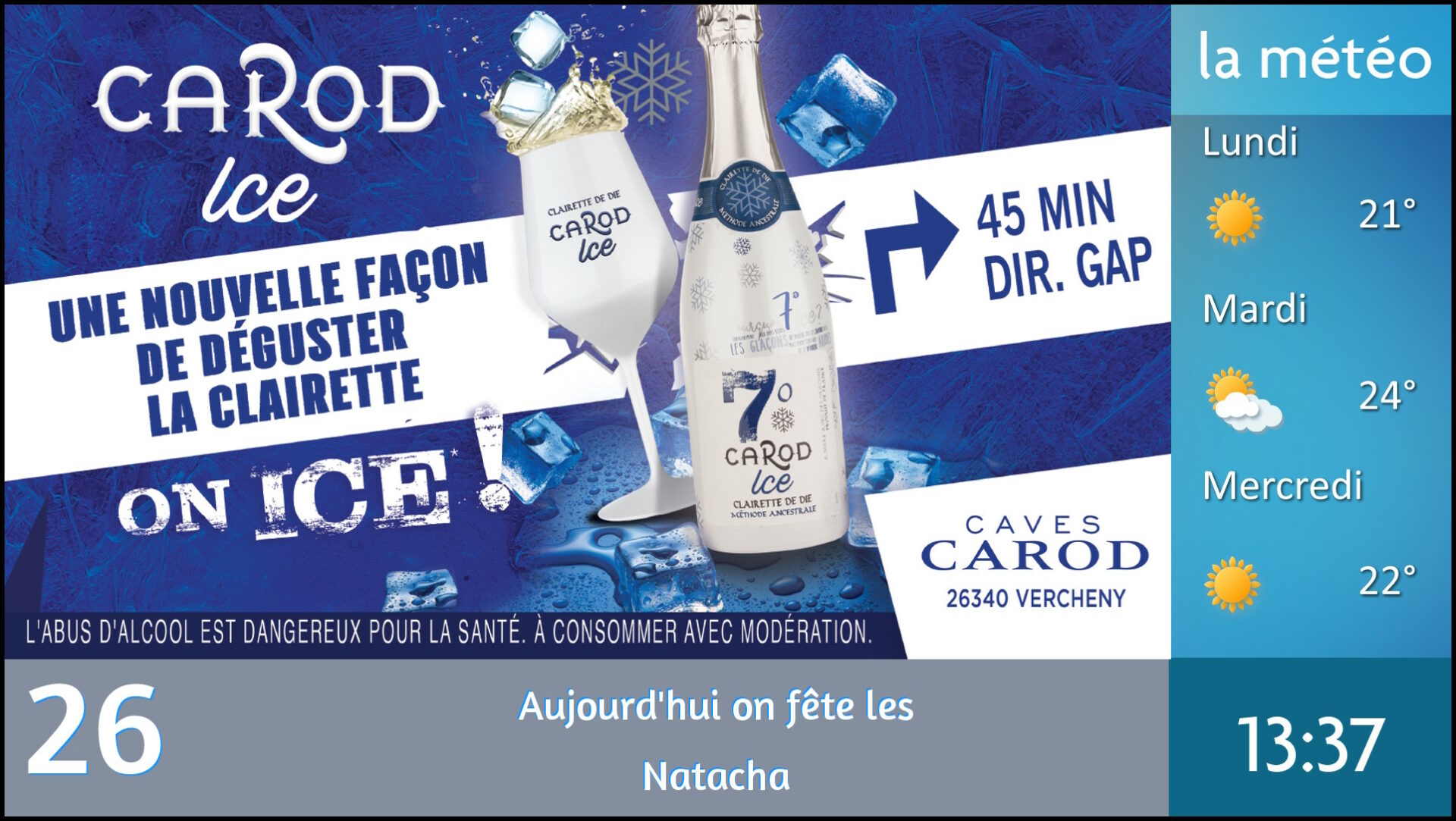
Installing several screens in one venue does not automatically create a coherent communication journey. When every display repeats the same message at the same time, the installation quickly loses much of its value. Conversely, making every screen completely different can create visual disorder and make day-to-day operation unnecessarily complex.
The challenge is to build one shared scenario while giving each screen a specific purpose. Multizone digital signage adds another level: one display can combine a main message with complementary information. The following method helps decision-makers coordinate both levels without overloading the audience or the operating team.
Think in scenarios, not in screen numbers
Before producing content, observe the visitor’s actual journey. A screen at the entrance has neither the same attention window nor the same purpose as a display in a waiting area, aisle or service point. Orchestration begins with these viewing situations, not with the creation of one playlist intended for every device.
- An attraction screen captures attention with a message that can be understood immediately.
- A wayfinding screen helps visitors find an area, service or practical information.
- A consultation screen develops a topic where visitors have more time available.
- A reminder screen reinforces a message encountered earlier in the journey.
Separate multizone orchestration from multi-screen orchestration
Several types of content on one screen
SanCube divides a screen into several areas so that a main communication and complementary content can be presented simultaneously. One zone may show the priority visual while others provide local information, the date, time, weather, a feed or useful news. The composition must retain a clear visual hierarchy so viewers immediately know where to look first.
Several screens across one visitor journey
In a multi-screen configuration, the objective is not to divide one display surface but to distribute messages across space and time. Screens can show different content while contributing to the same campaign. SanDisplay supports remote content creation, scheduling, distribution and supervision across the screen network. The operator still needs to define the editorial scenario: which screen should communicate, at what moment and with what level of detail?
Decide what should be synchronised
Screens do not need to remain synchronised all the time. A shared sequence can be useful for launching a campaign, announcing an event or creating a visible highlight throughout the venue. At other times, content adapted to each location is generally more useful. The practical approach is to synchronise important moments rather than impose continuous identical playback.
- Identify the campaign or period’s priority message.
- Determine which screens genuinely need to participate in the highlight.
- Prepare a short version for circulation areas and a more detailed version for waiting areas.
- Define what will play before and after the shared sequence.
- Check that each screen remains useful when the shared campaign is not active.
Create a simple orchestration matrix
An editorial matrix prevents the network from being managed screen by screen without an overall view. It can cross-reference locations, audiences, objectives, time slots and content families. This document provides a common reference for communication, marketing, operations and technical teams. It also simplifies decisions whenever a new publishing request appears.
- The location and viewing context of each screen.
- The primary objective: attract, inform, guide, promote or reassure.
- The probable exposure time and viewing distance.
- The permanent, temporary and automatic content allowed.
- The person responsible for creation, approval and scheduling.
Prepare complementary playlists
Orchestration becomes easier when content is designed as a family. One campaign may include an attraction visual, an explanation, a reminder and practical information. These assets share the same visual codes without necessarily repeating the same wording. Visitors recognise the campaign throughout their journey while discovering new information on each display.
On a multizone screen, this approach can combine a strong media asset with more regular information services. The playlist can alternate between SanCube compositions and full-screen media. This makes it possible to reserve the entire display for a priority message when needed, before returning to a richer information layout.
Prevent visual and editorial overload
Adding zones should not mean adding competing requests for attention. Every composition needs an obvious entry point, short text and contrast suited to the viewing distance. Simultaneous movement in every zone can create competition between messages. It is often better to animate the main content and keep service information stable, or to organise a readable alternation between elements.
Include hardware constraints from the start
Orchestration also depends on display format, orientation, brightness and location. The selection of professional displays should therefore take place before templates are finalised. The planned configuration’s compatibility with SanCube must also be checked, particularly when existing equipment is to be retained. This prevents teams from designing a scenario that some devices cannot reproduce.
Test the scenario from the visitor’s perspective
- Walk through the venue in the usual direction of travel.
- Record which screens are visible at the same time and identify contradictory or redundant messages.
- Check whether each item can be understood within a few seconds.
- Review transitions between multizone compositions and full-screen media.
- Test the system at the different times of day included in the schedule.
What role can SanCube play?
SanCube addresses the need to present several pieces of information simultaneously on one screen. It does not replace the process of assigning a role to each display; it enhances it. Combined with structured network scheduling, it can alternate prominent communications, local information and service content. The aim is not to multiply messages, but to use each available display surface more coherently.
Frequently asked questions
Should the same campaign appear on every screen?
A shared campaign identity is useful, but each screen can present a different stage. The entrance attracts attention, a waiting area explains the message and a display near the service reminds visitors what to do. Full repetition is mainly relevant during a deliberately synchronised highlight.
How many zones should a screen contain?
The answer depends on the format, viewing distance and amount of genuinely useful information. A few clearly prioritised zones are preferable to a difficult-to-read mosaic. Every area should have an identifiable purpose and dimensions suited to its content.
How should a multi-screen project begin?
Start by mapping locations, audiences and objectives, then build a test scenario using a limited number of screens. ALLSAN can help assess the relationship between displays, content, scheduling and multizone compositions. To establish the right structure, contact us to discuss your project.